Free Subscription Tracking App for Bills, Renewals, and Cost Review (2026)
A free subscription tracking app should make renewals, app memberships, streaming services, and other recurring charges easy to total and review without forcing a paid setup first.
Most people looking for a free way to track subscriptions are not asking for a complicated system. They want to identify recurring charges, total the monthly and annual cost, note renewal timing, and decide which services they still actually use.
That is also where the boundary becomes clear. Free tools are good for visibility, manual tracking, and a repeatable review habit. Connected tracking becomes more useful later if subscriptions are spread across several accounts or if the manual list keeps falling out of date.
Sumyfi is relevant if you want subscription review in the same product as transactions, budgets, goals, and the rest of your monthly planning.
At a glance
- Start free
- See recurring charges clearly
- Total monthly and annual cost
A manual subscription review is enough for many people. Move to a connected account view only if the upkeep stops being worth it.
A useful free tracker shows what renews, how often it bills, and what it costs over time.
Manual review is often enough when you have a manageable number of services and want visibility first.
Connected tracking becomes more useful when the list is hard to maintain by hand.
Free first pass
A free subscription tracking app should help you answer the basics quickly
The first job is simple: see what renews, when it renews, what it costs each month, and which services no longer feel worth carrying. A free tool is most useful when it makes that review light enough to repeat instead of turning it into a bigger admin project.
That usually means a cleaner list of recurring charges, a faster way to total the cost, and enough surrounding context to separate useful services from easy cuts.
Where free tools stop
Manual review is often enough at first, but broader tracking helps once the list stops feeling stable
A free tracker can be enough when the goal is catching obvious waste, totaling renewals, or building a simple monthly review habit. The limits show up when recurring charges are spread across several accounts, when the manual list falls out of date, or when subscription costs need to stay connected to the rest of the budget.
That is where a broader dashboard becomes more useful. Connected accounts, transactions, budgets, and goals make it easier to decide whether a recurring charge still fits the month instead of reviewing subscriptions in isolation.
Buyer checklist
What a free subscription tracker should make easy
- Can you record the service name, charge amount, billing frequency, and renewal timing without turning it into a project?
- Can you review subscriptions regularly and tell which ones are still useful versus simply familiar?
- Will the setup still feel manageable if charges are split across several cards, app stores, or bank accounts?
- If you outgrow the free method, is it clear whether you need more automation or just a better manual habit?
Why Sumyfi
Why Sumyfi may be useful here
Sumyfi is most relevant if you want subscription review to sit next to transactions, budgets, goals, and account visibility instead of living in a separate utility.
Monthly subscription audit
A simple recurring review is usually enough to keep subscriptions from fading into the background
This routine works with a free tracker, a spreadsheet, or a manual list. The important part is repeating it often enough that forgotten services do not become permanent.
Review the last few months of transactions
Look for merchants that repeat and separate real subscriptions from one-time purchases or unusual one-off charges.
Update the service list
Record the service name, amount, billing frequency, account or card, and any known renewal date.
Total monthly and annual cost
Convert annual services into monthly equivalents if that helps comparison, then also look at the true yearly total.
Check for price increases or unused services
Flag subscriptions you forgot about, charges that overlap with another service, or plans that are no longer worth keeping.
Cancel, downgrade, or keep deliberately
End the review with a decision for each questionable charge so the list turns into action instead of another passive record.
Product screenshots
What the screenshots should help you judge
These screenshots are most useful as examples of what an organized recurring-charge review looks like once subscriptions sit next to the rest of the month.
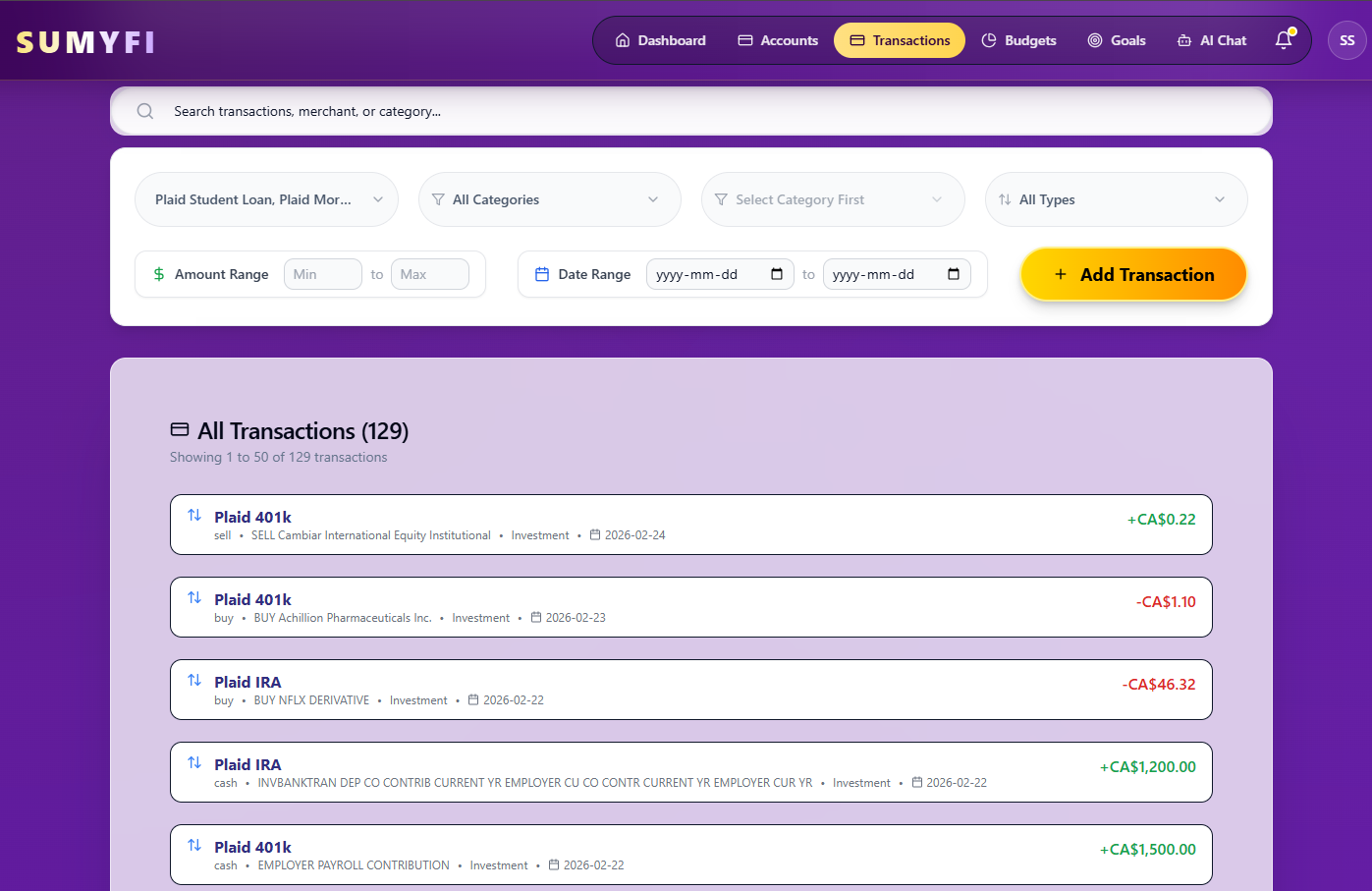
Transactions
Shows where repeated merchants can be reviewed alongside the rest of transaction activity.

Dashboard
Useful for judging whether recurring costs are becoming a larger part of the monthly picture.

Budgets
Helps show how subscription decisions affect the rest of the budget once the list is reviewed.
Comparison table
How free subscription-tracking approaches compare
The real difference is not whether each option can hold a list. It is how much maintenance, calculation, and context you want around that list.
| Decision area | Spreadsheet | Manual subscription list | Bank or card transaction history | Dedicated subscription tracker | Broader financial dashboard |
|---|---|---|---|---|---|
| Manual maintenance | Highest | Moderate | Low for raw history, high for organizing it | Usually lower | Lower once the overall system is set up |
| Recurring-charge visibility | Good if you build it well | Clear for smaller lists | Easy to miss repeats in transaction noise | Usually purpose-built for this job | More useful when subscriptions need to be seen beside the rest of the month |
| Monthly and annual cost review | Flexible formulas | Manual math | Needs manual totaling | Often easier | Useful when cost review affects wider budgeting decisions |
| Renewal tracking | Manual | Manual | Often indirect | Usually easier to keep visible | Helpful if renewals affect broader planning |
| Multiple accounts | Possible but manual | Can get messy quickly | Split across statements | Varies | Usually more useful when charges are spread across accounts |
| Best suited for | People who want full control | People who want a simple free habit | People starting from raw transaction history | People who mainly care about subscriptions | People who want recurring costs reviewed with budgets, balances, and goals |
Free plan
How to use the free option without overcomplicating the decision
The free path should help you test whether a subscription review habit is useful before you worry about deeper automation or broader account setup.
- Start with a simple recurring-charge review and decide first whether the visibility is already enough for your needs.
- Use the free setup to keep subscriptions, transactions, budgets, and goals visible in one place if you want them connected.
- Begin with a manual review if that is all you need, then consider supported account connections later only if the upkeep becomes too manual.
- Use pricing as a later decision after you know whether a more connected subscription workflow would actually save time.
Recommended next reads
Read 5 related articles next
Related reading for the next question.
FAQs
Frequently asked questions
Can I track subscriptions without paying for an app?
Yes. A manual tracker, spreadsheet, or even a well-maintained list can be enough if your main goal is to identify recurring charges, total what they cost, and review them regularly. The key is consistency, not whether the tool is expensive.
What should a free subscription tracker include?
At minimum it should show the service name, charge amount, billing frequency, monthly and annual cost, and any known renewal timing. It also helps if the list makes it easy to mark whether a service is still wanted.
Is a spreadsheet enough to track subscriptions?
For many people, yes. A spreadsheet works well if you do not mind manual updates and you want flexible formulas or notes. A dedicated tracker becomes more useful when the manual upkeep starts to outweigh the simplicity.
How can I find forgotten subscriptions?
Review the last two or three months of bank and card transactions, look for repeated merchants, and cross-check unclear charges against app-store settings or email receipts. Then confirm whether each repeated charge is still wanted or just familiar.
How do I calculate what my subscriptions cost per year?
Add your monthly services together, then multiply each monthly charge by 12 for a yearly view. Also include annual services directly. For example, a $12 monthly service costs $144 per year, and a separate $79 annual renewal should be added on top of that.
When is automatic subscription tracking worth paying for?
It becomes more useful when subscriptions are spread across multiple accounts or cards, when you keep forgetting to update the list, or when recurring costs need to be reviewed alongside broader budgeting and account decisions.
Can I start tracking subscriptions manually?
Yes. In many cases that is the best place to start. A manual list helps you understand the recurring-spend problem before deciding whether more automation is actually necessary.
Can Sumyfi be used without paying?
Sumyfi has a free account option, and it is most relevant here if you want subscription review in the same product as transactions, budgets, goals, and other financial tracking.