No Download Subscription Tracker That Still Shows the Full Bill Picture
Track recurring merchants, renewal buffers, and monthly subscription drag for no download subscription tracker from one review surface without bouncing between statements, inbox searches, and card apps before another renewal slips into background noise.
At a glance
- Browser-first tracking
- No app install required
- Built for cross-device subscription review
Start no download subscription tracker review with a free account and no payment details so subscriptions in a browser-based dashboard can be tested before any upgrade decision matters for this review.
Use the existing transaction feed to surface subscriptions that keep affecting subscriptions in a browser-based dashboard month after month.
Use reminder lead times such as 3 days, 7 days, or the due date so renewals do not slide by unnoticed in subscriptions in a browser-based dashboard.
Review how repeating charges change subscriptions in a browser-based dashboard overall instead of treating each renewal like an isolated event.
Why this page exists
No-download usually means the buyer wants less setup friction, not less financial detail
People who search for a no-download subscription tracker are usually trying to avoid a familiar pattern: downloading another app, making a new account, and still ending up with a thin recurring-bill list that never becomes part of a real review habit. The intent is not convenience for its own sake. The real goal is to open a browser, see subscriptions quickly, and decide what to cancel, keep, or monitor without another installation step slowing the process down.
That changes how this category should be judged. A useful no-download subscription tracker should still connect recurring charges to the wider money picture. When a renewal shows up, the user should be able to understand whether that charge is crowding out savings, overlapping with another tool, or quietly raising the baseline monthly burn. Sumyfi fits that need because the browser-first experience is tied to a broader dashboard instead of a one-job tracker that stops at listing merchants.
- Open in the browser without install friction
- Review recurring charges in a wider money context
- Decide what to cancel before renewals compound
First-week evaluation
What a browser-first subscription tracker should prove in the first few sessions
The first test is speed. You should be able to open the dashboard from a laptop, review recurring charges in minutes, and spot which payments actually deserve a decision. The second test is continuity. If you return later from another device, the workflow should still feel coherent instead of forcing you back through a mobile-only path or a fragmented billing list.
The stronger products in this category do more than label subscriptions. They make it easier to compare monthly commitments against the rest of the spending picture, which is where better cancellation decisions happen. That is where Sumyfi has a structural advantage: the same workflow can support subscription review, account visibility, budgeting pressure, and broader monthly cleanup without asking the user to move between disconnected tools.
- Can you identify recurring waste quickly?
- Can you continue the review across devices?
- Can you connect subscriptions to the rest of the month?
Where Sumyfi fits
Why Sumyfi is stronger than a thin browser-only subscription list
A no-download experience only matters if it still leads to better decisions. Sumyfi gives users a browser-based starting point, but the benefit is that recurring charges live inside a broader money workflow. That means the same place you review subscriptions can also help explain cash pressure, savings tradeoffs, and the cost of forgotten renewals over time.
For buyers who want a no-download subscription tracker, that broader fit matters more than an app-store badge. It is the difference between a quick one-time cleanup and a system that stays useful after the obvious cancellations are already gone. If the goal is lower friction plus better subscription decisions, the web-based workflow has to hold up over repeated weekly reviews, and that is the bar Sumyfi is built for.
3-step setup
How Sumyfi handles subscription tracking in 3 steps
The key test is whether recurring-bill review becomes a repeatable monthly habit.
Link accounts or enter subscriptions manually
Create the free dashboard, then pull in transactions through a read-only bank-linking flow or start with a manual list for subscriptions in a browser-based dashboard.
Detect recurring merchants and set renewal alerts
Map recurring services by category and attach reminder timing that protects subscriptions in a browser-based dashboard before the next billing cycle.
Audit monthly burn and decide what stays
Review the annualized cost, check the cash-flow impact, and keep, downgrade, or cancel charges from the same no download subscription tracker dashboard.
Product screenshots
See the product behind the copy
Screenshots shown: Subscriptions, Transactions.
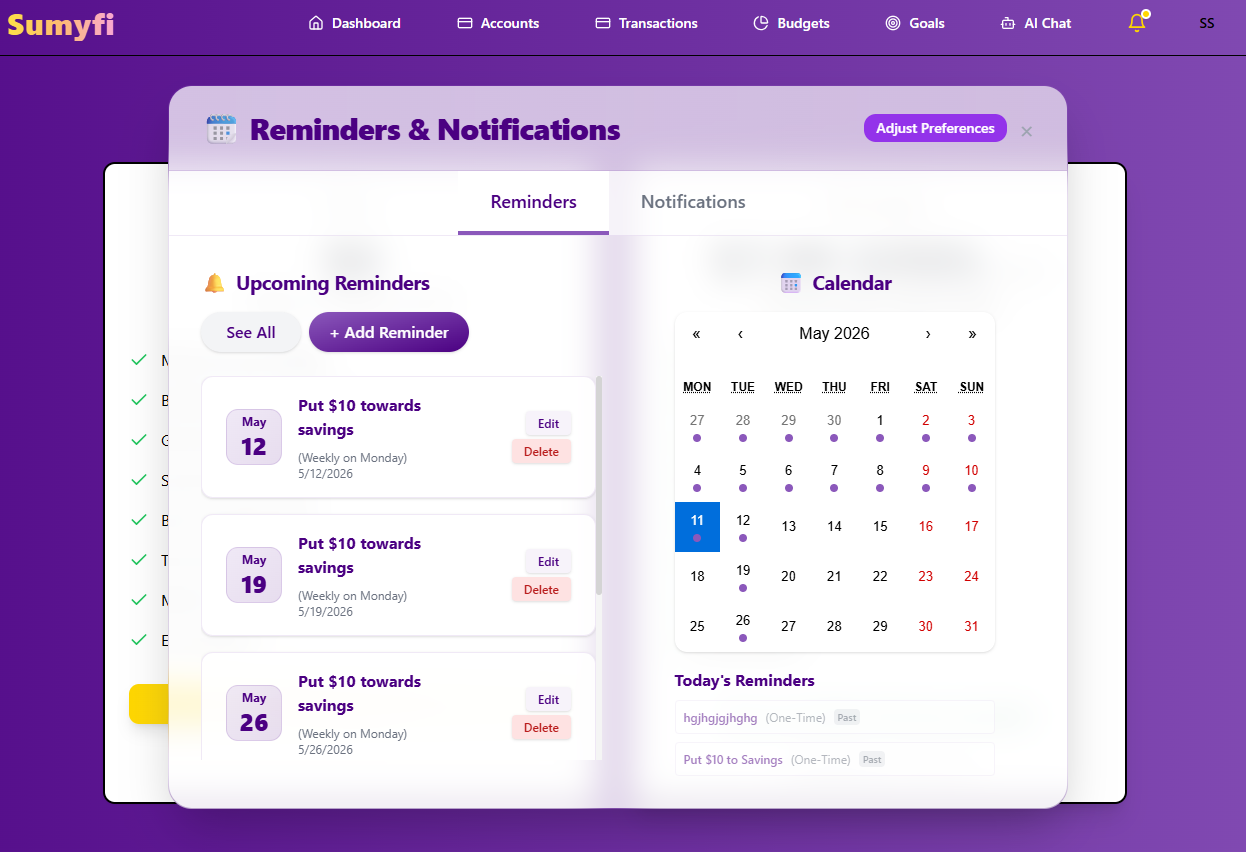
Subscriptions brings recurring charges, reminders, and renewals into one review.
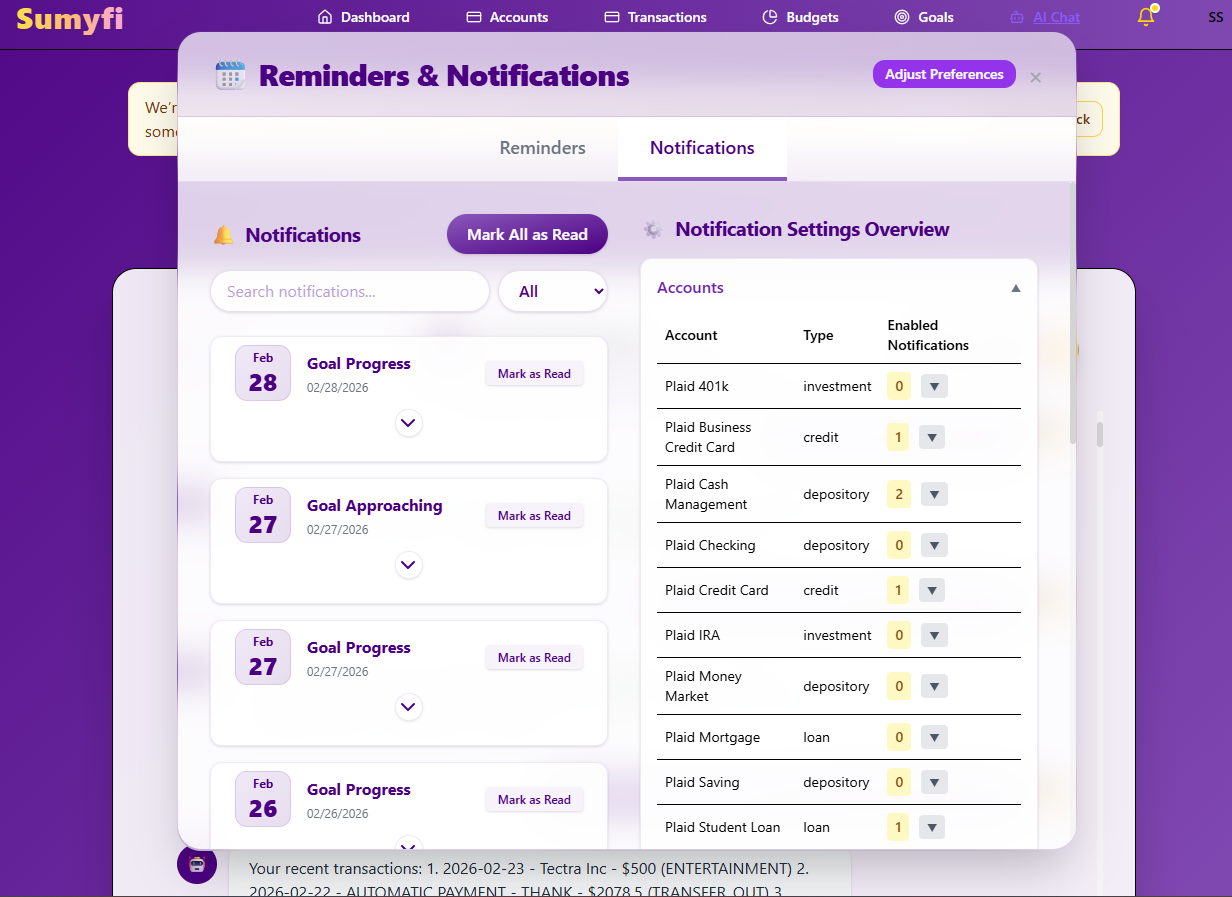
Subscriptions brings recurring charges, reminders, and renewals into one review.
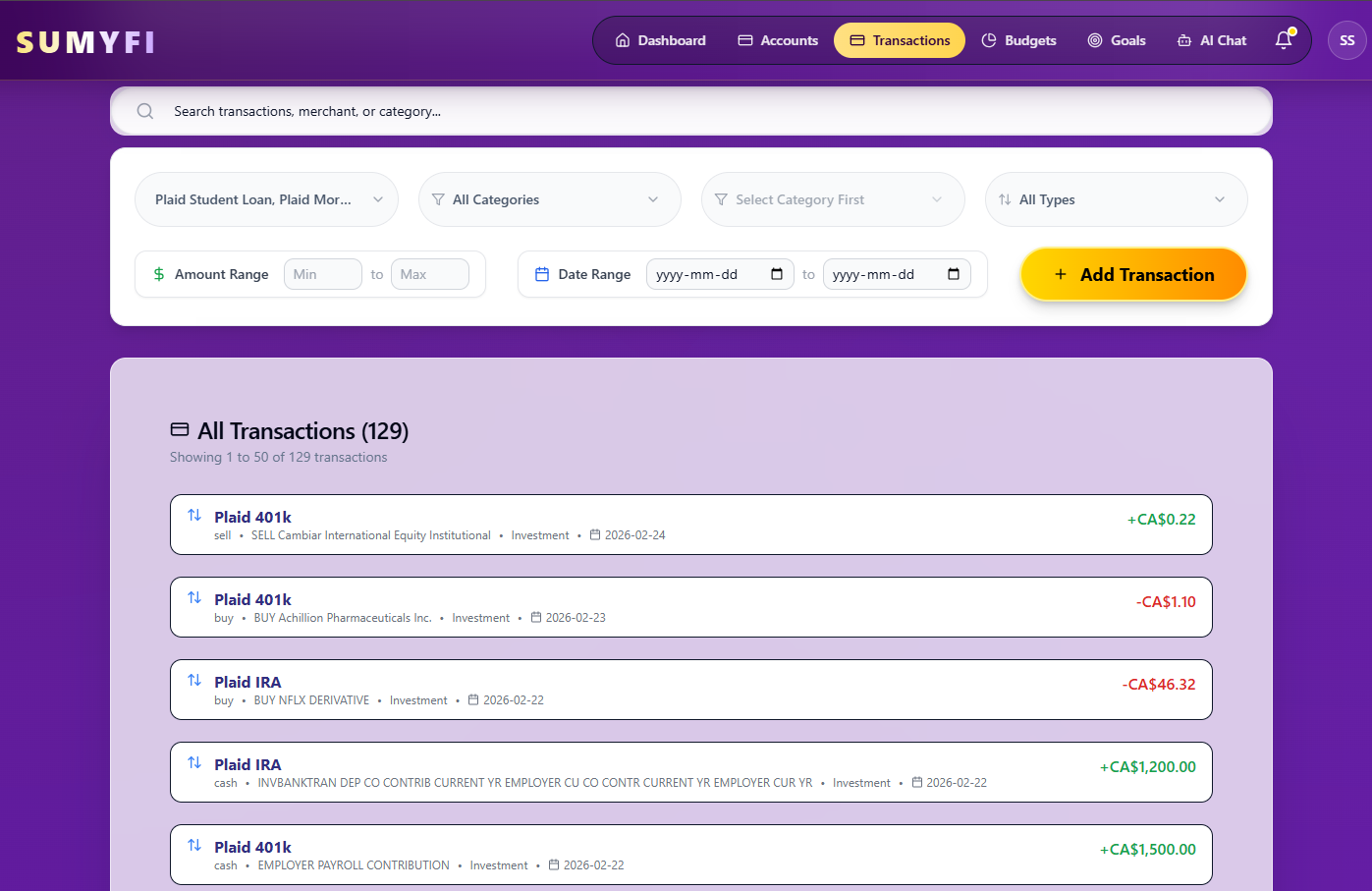
Transactions brings recurring charges into one review so upcoming renewals are easier to spot.
Comparison table
How no download subscription tracker compares when the goal is broader recurring-spend control
Keep the comparison centered on reminder control, recurring-charge context, and what happens after the easy cancellations past setup week for this workflow.
| Decision area | Sumyfi | Traditional single-purpose trackers |
|---|---|---|
| Recurring merchant review | Recurring merchants, renewals, and reminder timing in one dashboard | Charge list with lighter monthly context |
| Reminder intervals | 3-day, 7-day, or due-date alert timing | Simpler nudges with less control over timing |
| Category clarity | Separate streaming, software, memberships, and fixed bills | Recurring charges are often grouped more broadly |
| After-cancellation value | Still useful for subscriptions in a browser-based dashboard and monthly tradeoffs | Often strongest only during the first cleanup pass |
Free plan
What's included in the free plan
This no download subscription tracker section keeps the no-card starting point visible so buyers can test recurring-charge review before upgrades enter the conversation on This guide.
- Create an account and open the dashboard without entering a credit card.
- Keep balances, transactions, and recurring activity tied to subscriptions in a browser-based dashboard from the same web dashboard.
- Add supported no download subscription tracker account connections later once subscriptions in a browser-based dashboard already feels worth repeating for this workflow.
- Use the pricing page for no download subscription tracker only after the free workflow has been tested for current upgrades, Stripe-managed checkout details, and promotion-code support on this path.
Recommended next reads
Read 5 related articles next
Related reading for the next question.
FAQs
Frequently asked questions
Is no download subscription tracker really free to start?
Yes. The subscription workflow starts without payment details while subscriptions in a browser-based dashboard is tested manually before paid depth matters during the first billing cycles.
How do renewal reminders work?
You can place reminder timing around each renewal so the charge can be reviewed before, shortly before, or exactly on renewal day before the bill blends into the statement.
Can it separate streaming, SaaS, and other recurring merchants?
Yes. The dashboard helps sort streaming, software, memberships, delivery, and fixed bills into distinct groups so subscriptions in a browser-based dashboard is not reduced to one undifferentiated recurring-charge list during review.
Does it help after I cancel the obvious services?
Yes. After the first round of cancellations, the same dashboard still helps with renewal review monthly tradeoffs that keep affecting subscriptions in a browser-based dashboard instead of ending after one cleanup pass.