Web Based Subscription Tracker for Faster Weekly Renewal Reviews
Review recurring charges, renewal timing, and monthly cash-flow impact from one dashboard without bouncing between statements, inbox searches, and card apps before another renewal slips into background noise.
At a glance
- Monthly bills in one view
- Easier weekly check-ins
Test a free web based subscription tracker dashboard with no credit card required while a web-based subscription tracker for recurring charges, monthly bills, and cancellation decisions stays visible through read-only bank security for this review.
Spot recurring merchants and repeating payment patterns from the same dashboard you use for the wider monthly review.
Set renewal buffers a few days ahead, a week ahead, or right at the due date for a web-based subscription tracker for recurring charges, monthly bills, and cancellation decisions while cancellation or downgrade options are still on the table instead of after the statement closes.
See how renewals and recurring bills affect the month so the next keep, cancel, or downgrade decision has context for this billing cycle.
Browser-first advantage
A web-based subscription tracker should make recurring-bill review easier to repeat
The reason people look for a web-based subscription tracker is simple: the browser is often the fastest place to do serious financial review. A large screen, a normal keyboard, and immediate access from work or home can make it easier to spot forgotten renewals, duplicate streaming services, or software subscriptions that quietly drifted into the monthly budget. If the product still forces the user into a clumsy mobile-first workflow, the web-based promise is mostly cosmetic.
That is why the best web-based trackers do not stop at showing a merchant list. They make it easier to judge recurring charges in context. A subscription is rarely a problem in isolation. It becomes a problem when it overlaps with a savings goal, squeezes category flexibility, or survives only because nobody sees the total recurring drag clearly. Sumyfi is built around that broader review loop, which makes the web experience more useful than a narrow renewal log.
- Better for laptop-based weekly reviews
- Useful from any browser session
- Built for recurring-charge decisions, not just labels
What to compare
How to tell whether an online subscription dashboard is actually decision-ready
A strong web-based subscription tracker should help answer three questions fast. What is renewing soon? Which recurring payments are still worth keeping? How does the subscription list affect the rest of the monthly plan? If the tool can only answer the first question, it is still leaving the harder financial work to the user.
Sumyfi performs better when the buyer wants those answers in one place. Subscription review connects to broader account visibility, spending awareness, and monthly planning, so the browser session becomes more than a one-purpose checklist. That gives users a stronger reason to come back every week instead of only opening the dashboard when a charge feels suspicious.
- See upcoming renewals clearly
- Judge whether each subscription still earns its cost
- Keep recurring bills connected to the wider budget
Why it fits Sumyfi
Sumyfi works when the goal is a repeatable online review habit
The best reason to choose a web-based subscription tracker is not just access. It is repeatability. If the dashboard is easy to open and useful enough to interpret quickly, it can become part of a weekly rhythm where renewals, savings tradeoffs, and wasted spend stay visible before they snowball into a bigger problem.
Sumyfi supports that rhythm by keeping subscriptions inside a broader personal-finance workflow. Users can review recurring charges from the browser, understand how those charges affect the month, and keep the process lightweight enough to maintain. For a search like web-based subscription tracker, that is a more durable answer than a simple merchant list with no real decision context.
3-step setup
How to audit recurring charges in 3 steps
This workflow is built for catching renewals, setting reminders, and auditing monthly burn quickly.
Link accounts or enter subscriptions manually
Create the free dashboard, then pull in transactions through a read-only bank-linking flow or start with a manual list for a web-based subscription tracker for recurring charges, monthly bills, and cancellation decisions.
Detect recurring merchants and set renewal alerts
Group recurring merchants into clear categories then attach reminder windows that protect a web-based subscription tracker for recurring charges, monthly bills, and cancellation decisions before the next renewal during the current month.
Audit monthly burn and decide what stays
Review the monthly and annual cost of recurring charges, then decide what to keep, downgrade, or remove from a web-based subscription tracker for recurring charges, monthly bills, and cancellation decisions.
Product screenshots
See the product behind the copy
Screenshots shown: Subscriptions, Transactions.
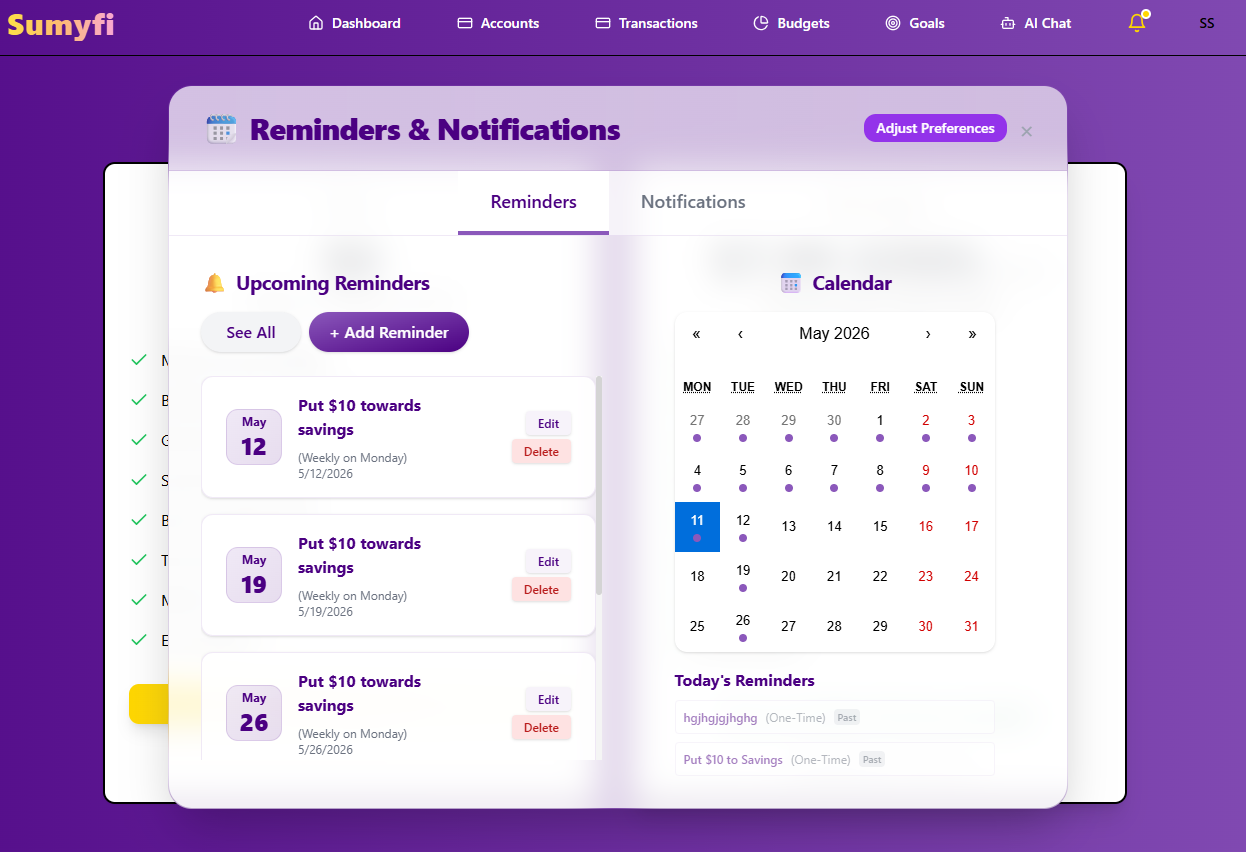
Subscriptions brings recurring charges, reminders, and renewals into one review.
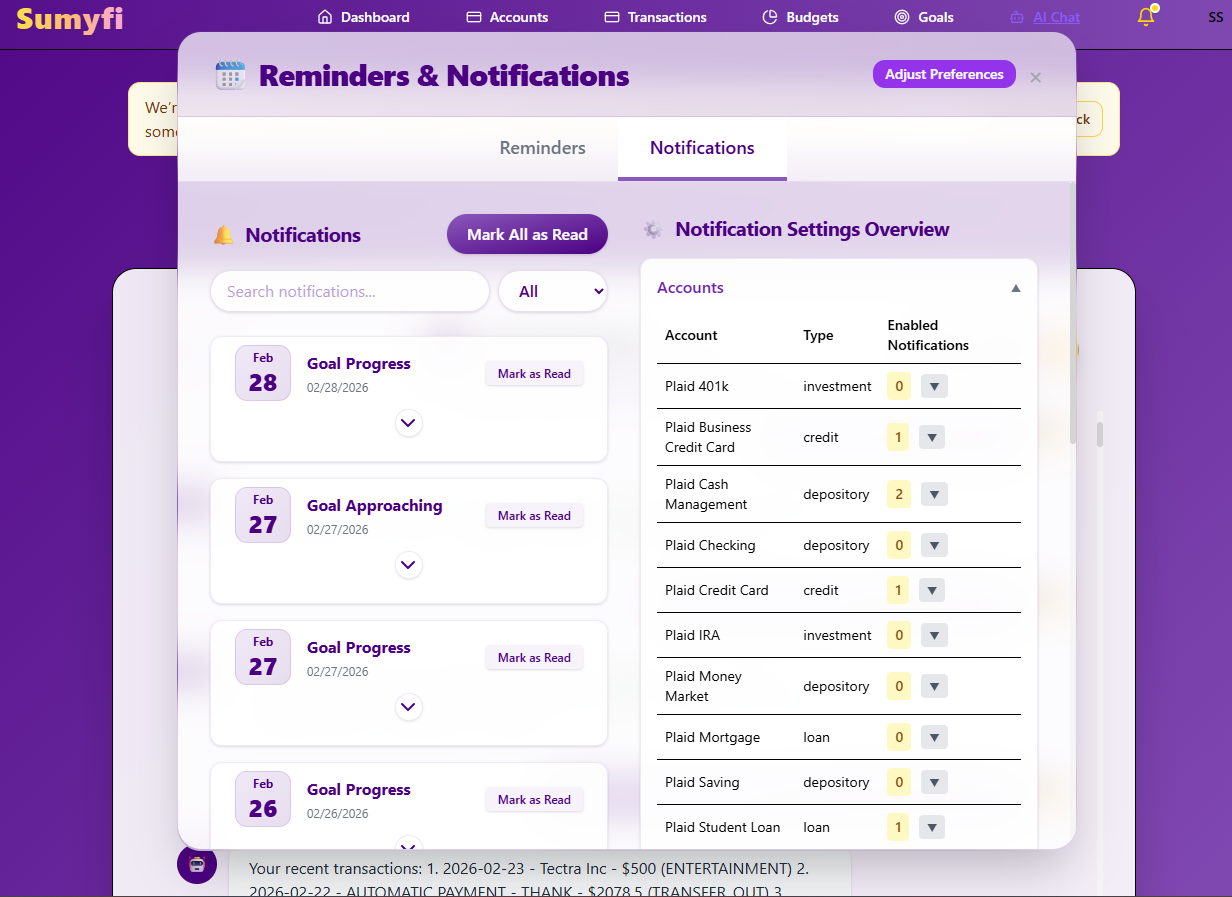
Subscriptions brings recurring charges, reminders, and renewals into one review.
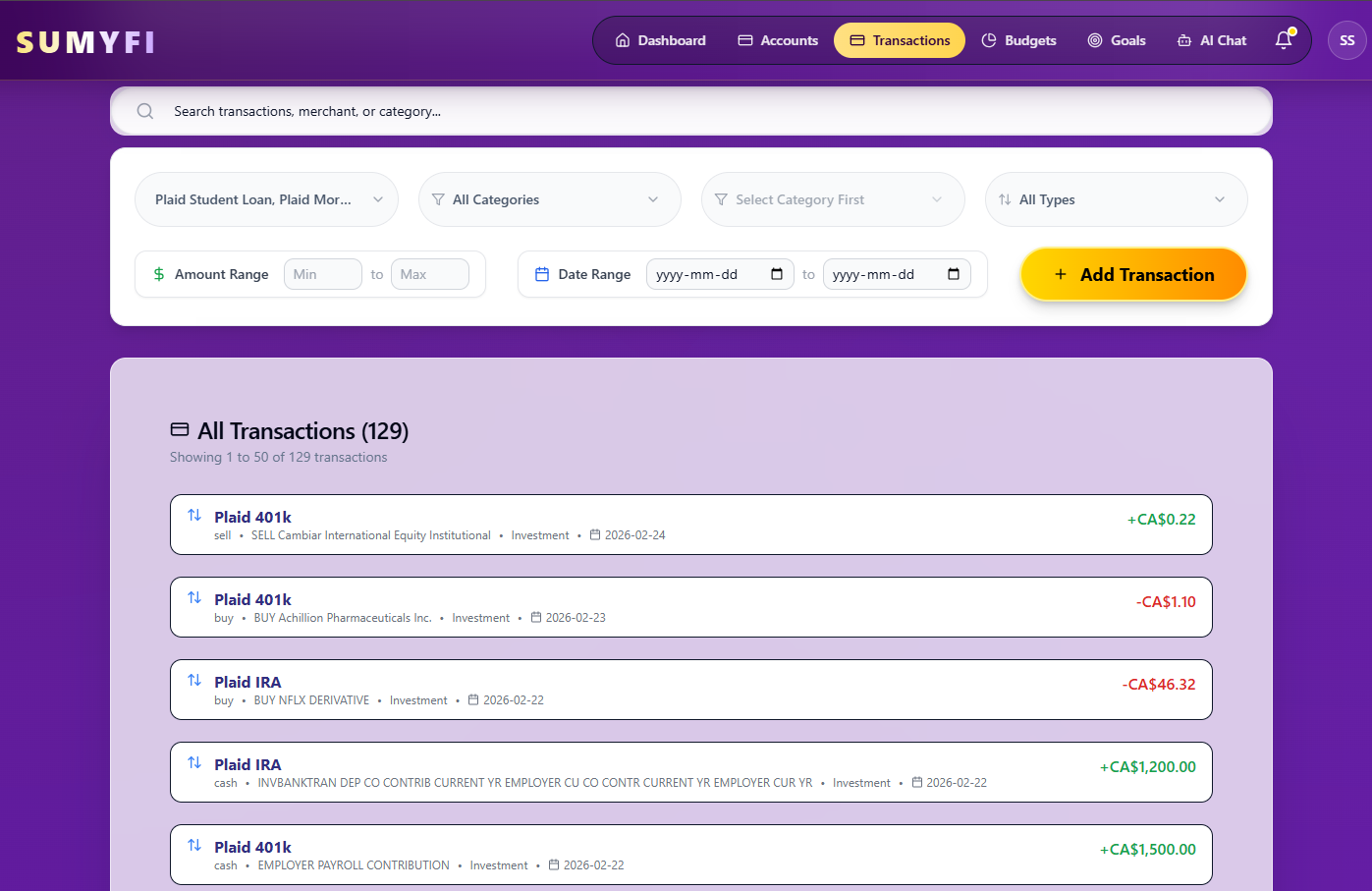
Transactions brings recurring charges into one review so upcoming renewals are easier to spot.
Comparison table
How web based subscription tracker compares when the goal is broader recurring-spend control
Compare the reminder workflow, the recurring-merchant review, and the monthly cash-flow context directly for web based subscription tracker.
| Decision area | Sumyfi | Traditional single-purpose trackers |
|---|---|---|
| Recurring merchant review | Recurring merchants, renewals, and reminder timing in one dashboard | Charge list with lighter monthly context |
| Reminder intervals | 3-day, 7-day, or due-date alert timing | Simpler nudges with less control over timing |
| Category clarity | Separate streaming, software, memberships, and fixed bills | Recurring charges are often grouped more broadly |
| After-cancellation value | Still useful for a web-based subscription tracker for recurring charges, monthly bills, and cancellation decisions and monthly tradeoffs | Often strongest only during the first cleanup pass |
Free plan
What's included in the free plan
Subscription pages should explain the free start plainly before paid depth enters the decision so the buyer can judge recurring-charge value before pricing details dominate before the premium comparison starts.
- Open a free account first so the workflow can be tested before any paid decision is required.
- Track balances, transactions, categories, goals, and recurring bills from the same web interface.
- Start with a manual web based subscription tracker dashboard setup if you want to test web based subscription tracker before connecting institutions during the first review cycles.
- Let the free web based subscription tracker workflow prove itself before pricing takes over after a web-based subscription tracker for recurring charges, monthly bills, and cancellation decisions is clear enough to judge for this decision.
Recommended next reads
Read 5 related articles next
Related reading for the next question.
FAQs
Frequently asked questions
Is web based subscription tracker really free to start?
Yes. The free start lets you review recurring merchants and early cancellation candidates before you commit to any upgrade for this workflow.
How do renewal reminders work?
The reminder workflow for web based subscription tracker exists to surface renewals before they disappear into the monthly feed not after the monthly damage is already done for this cycle.
Does it help after I cancel the obvious services?
Yes. The goal is not just one fast cancellation sweep It is to keep recurring spend visible enough that the monthly habit survives for this workflow.