Sumyfi Editorial Team • Updated 2026-09-01
How to Switch from Mint (2026)
Switching from Mint is not only about exporting data. It is about rebuilding one weekly money habit in a system that feels cleaner, more current, and easier to trust after the migration setup is over.
People figuring out how to switch from Mint usually do not want another generic comparison table. They want a concrete way to move out of a dead workflow and into a cleaner one without losing visibility or rebuilding everything by hand.
The strongest migration guide narrows the switch down to the essentials: get your account picture back, make recurring charges visible again, reconnect savings goals and budgets, and choose a dashboard that is easier to keep using after the first week.
If you want the post-Mint setup to feel simpler, more current, and less fragmented than what you had before, Sumyfi is the kind of dashboard this migration should point you toward.
At a glance
- Move your workflow, not just your data
- Subscriptions and savings in one view
- Cleaner post-Mint setup
Most Mint migrations fail when users replace one dashboard with a pile of partial tools.
A good switch restores the weekly money habit quickly instead of chasing perfect setup.
The valuable part of Mint was not the interface alone. It was having one place to review the month.
Switching steps
A practical way to switch from Mint without making the migration heavier than it needs to be
Start by deciding what the new dashboard needs to answer every week. For most people that is not fifty granular reports. It is balances, subscriptions, category drift, savings progress, and whether anything urgent changed. That list becomes the migration checklist.
Next, restore visibility before precision. Connect the accounts that matter most, review recurring charges, and make sure the new product already helps with real decisions before you invest time in edge-case cleanup. This prevents the switch from turning into an endless data-maintenance project.
Then choose the product that feels easiest to live inside. The post-Mint winner is usually not the closest visual clone. It is the system that makes weekly money review faster and clearer once real life gets busy again.
- Restore your weekly review habit first
- Reconnect subscriptions, goals, and balances before chasing perfection
- Choose the tool you will actually keep opening
Buyer checklist
What to preserve when switching from Mint
- Can you quickly restore one place to review balances, recurring charges, and category drift?
- Will the new system reduce spreadsheet dependence instead of increasing it?
- Are subscriptions, savings goals, and account visibility kept in one practical workflow?
- Does the new product feel simple enough to revisit every week?
- Is the company trustworthy enough for a long-term financial dashboard relationship?
Why Sumyfi
Why Sumyfi is a strong post-Mint destination
The strongest case for Sumyfi is that it turns the migration into a cleaner financial tracking upgrade instead of a nostalgic downgrade. The dashboard is built to reconnect accounts, recurring charges, savings goals, and planning inside one system.
Implementation routine
How to compare Sumyfi with Mint in practice
This how to switch from mint routine should compare the product fit behind Mint instead of stopping at screenshots, pricing blurbs, or feature grids rather than producing one more superficial verdict.
Review the broader workflow
Begin with the strengths that make Mint worth considering and then note what still feels fragmented around rebuilding a post-Mint weekly money routine with cleaner account review, recurring-charge visibility, and goal tracking during a normal review.
Pressure-test the missing context
Map the part of the month Mint still leaves fragmented through the balances, recurring obligations, and category pressure that shape rebuilding a post-Mint weekly money routine with cleaner account review, recurring-charge visibility, and goal tracking so the comparison ends with a practical next step instead of a vague preference.
Choose the better long-term fit
Decide whether Sumyfi or Mint gives rebuilding a post-Mint weekly money routine with cleaner account review, recurring-charge visibility, and goal tracking the cleaner long-term home when the month gets ordinary and slightly messy again around rebuilding a post-Mint weekly money routine with cleaner account review, recurring-charge visibility, and goal tracking when the next real decision depends on Mint fitting the wider month.
Product screenshots
See the product behind the copy
Screenshots shown: Dashboard, Accounts, Budgets.

Dashboard shows the dashboard buyers would actually be switching into.
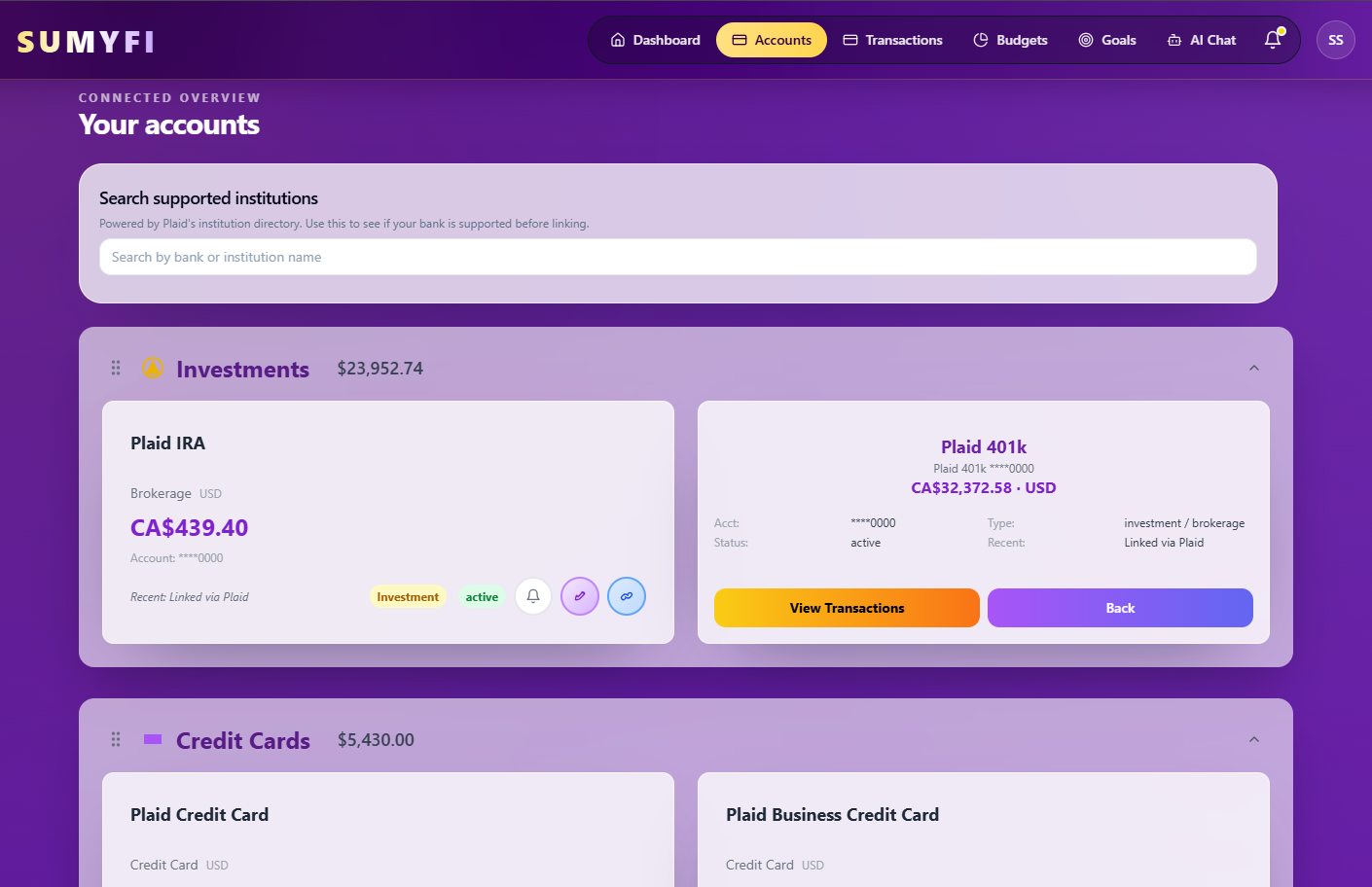
Accounts shows the account view buyers would actually use after switching.

Budgets shows how budgets fit into the broader replacement workflow.
Comparison table
How Sumyfi compares with Mint
The real question in how to switch from mint is whether Mint solves enough of the month or whether a broader dashboard fits better.
| Decision area | Sumyfi | Mint |
|---|---|---|
| Workflow scope | Broader dashboard that keeps rebuilding a post-Mint weekly money routine with cleaner account review, recurring-charge visibility, and goal tracking connected in one place. | Mint may stay closer to its narrower core strength |
| Recurring-cost context | Subscription and bill decisions remain inside the same dashboard as balances and categories. | Mint is more likely to leave recurring-bill context apart from rebuilding a post-Mint weekly money routine with cleaner account review, recurring-charge visibility, and goal tracking. |
| Weekly review fit | Built to keep rebuilding a post-Mint weekly money routine with cleaner account review, recurring-charge visibility, and goal tracking usable week after week. | Fit depends on whether Mint solves enough without broader monthly context. |
Recommended next reads
Read 5 related articles next
Related reading for the next question.
FAQs
Frequently asked questions
What is the best way to switch from Mint?
The best way is to restore your weekly money view first: accounts, recurring charges, savings goals, and the key signals you actually use to review the month. Do that before trying to replicate every old category or report.
Should I export all my Mint data before switching?
It is reasonable to export what you want to keep for reference, but the bigger decision is choosing a new system that becomes useful quickly. Over-migrating every detail often slows down the switch more than it helps.
What should replace Mint after the migration?
The strongest replacement is usually the one that brings accounts, subscriptions, savings goals, and planning back into one clear workflow. Sumyfi is built around that broader financial tracking approach.
Keep exploring
Best next pages after this Mint migration guide
Visitors switching from Mint usually split into a few clear next steps: alternatives, subscriptions, savings tracking, or all-account visibility.